TEST 009
50 things to do with ChatGPT's Intelligent UI
Short answer
Intelligent UI is how GPT-6 in ChatGPT turns an answer into something you can use: sliders, buttons, forms, charts, maps, quizzes and games, right in the chat. It's on by default in the Chat tab, and ChatGPT picks the format for each question. If you get plain text, ask for the tool by name.
Here are 50 things to do with ChatGPT's Intelligent UI. The first 10 come with a screenshot and the exact prompt. The other 40 are prompts to try. Copy one, change the numbers to yours, and paste it into a new chat.
What Intelligent UI is
Intelligent UI came with GPT-6 in ChatGPT. OpenAI says an answer can now include "graphics, tappable buttons, forms, charts, and interactive experiences you can use directly in your conversation."
So instead of reading a wall of text, you drag a slider, tick a box or play a round. You don't switch anything on. ChatGPT picks the format for each question, and a simple question still gets plain text.
How to get the most from it:
- Name the tool you want: "a calculator", "a form", "a quiz", "let me try it".
- Say what you want to change: "let me adjust the budget", "add a slider for tax".
- Got plain text? Ask for the tool in the same chat.
- Want fewer visuals? On the web: Personalization, Layout and Visuals, Simple.
The first 10, with screenshots
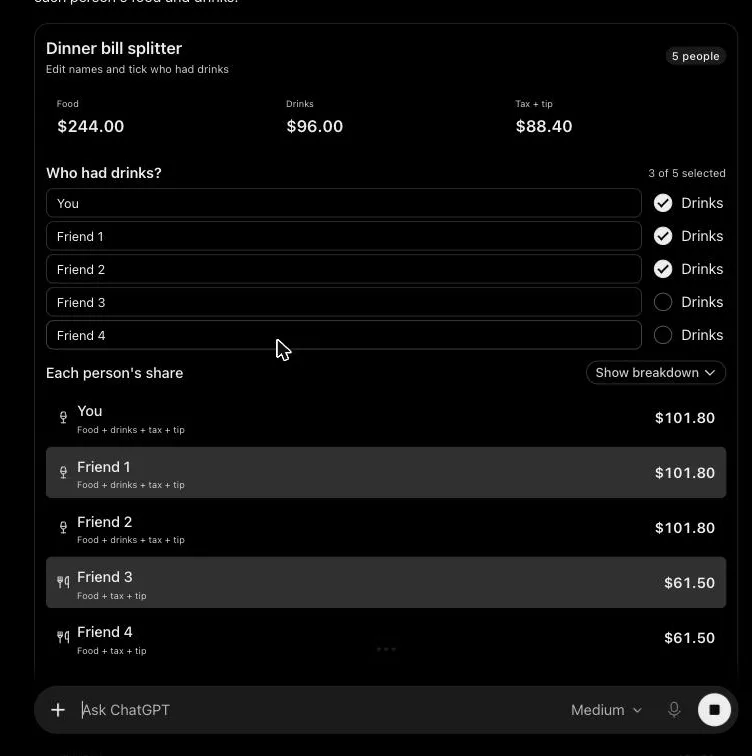
01. Bill splitter
Build me a bill splitter for dinner with four friends. The bill is $340 before tax. Tax is 8% and we tip 18%. Two of us didn't drink, so let me tick who had drinks and split the drinks part ($96) only between them.A calculator for five people, you plus four friends. Tick who had drinks and every share updates. With 8% tax and an 18% tip, the total comes to $428.40.
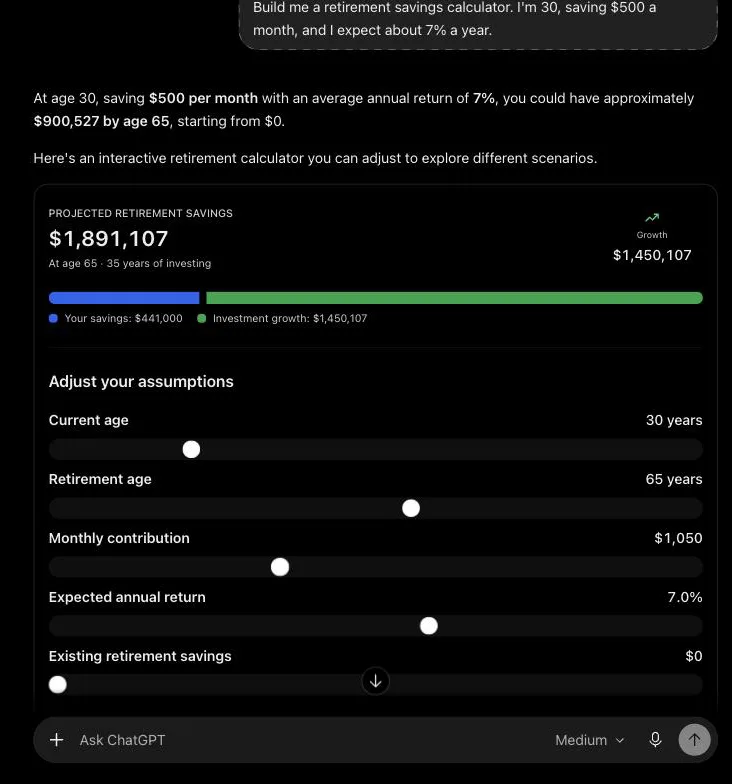
02. Retirement calculator
Build me a retirement savings calculator. I'm 30, saving $500 a month, and I expect about 7% a year.It shows $900,527 at 65, with sliders for your age, retirement age, monthly savings and return. Drag the monthly amount to $1,050 and the total climbs to $1,891,107. An inflation slider shows what that total would buy now.
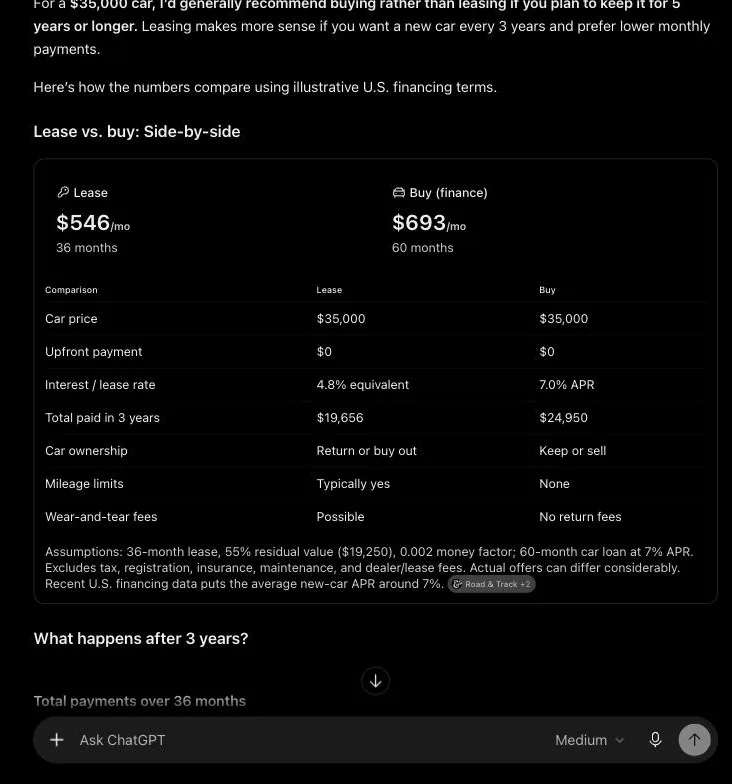
03. Lease or buy
Should I lease or buy a $35,000 car? Compare them side by side for me.Lease at $546 a month against buying at $693, side by side, with a chart and a form to rerun it with your own numbers. Over three years leasing came out about $1,500 cheaper, but it suggests buying if you keep the car five years or more.
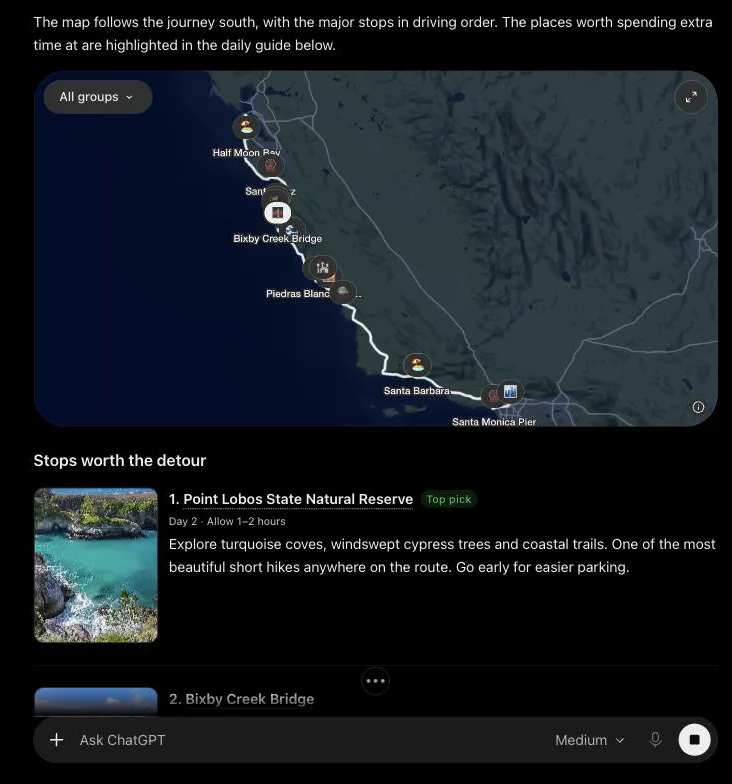
04. Road trip on a map
Plan a 4-day road trip down the California coast from San Francisco to Los Angeles, and show me the stops worth a detour.It looks up the route, then draws it on a map with every stop. Tap a pin for a place card with the rating, opening hours and directions.
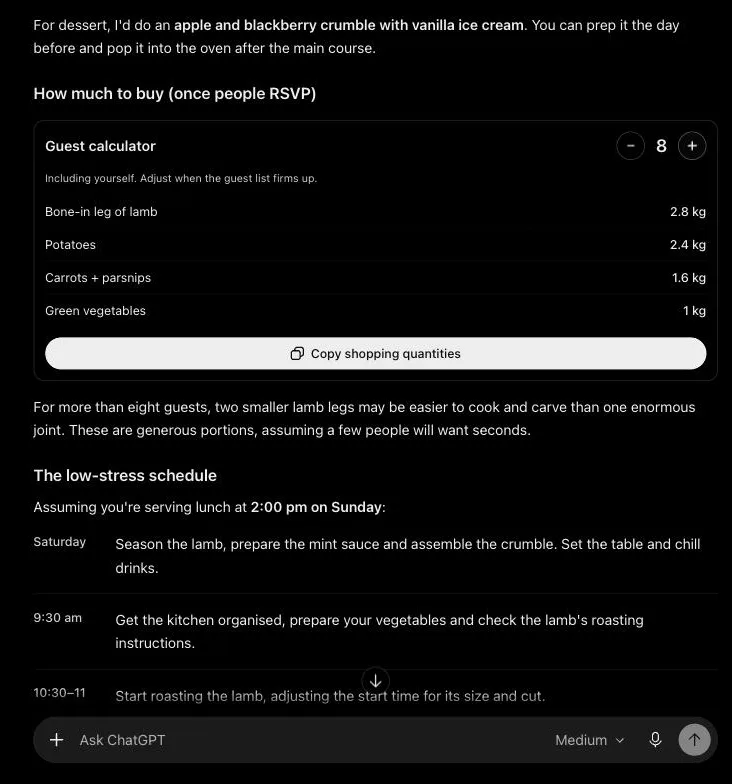
05. Dinner for a changing guest list
Give me a plan for a sunday lamb roast, I'm having friends over still figuring out numbers tbhA menu, a cooking schedule and a guest counter that includes you. Go from 6 to 8 guests and the lamb goes from 2.1 kg to 2.8 kg, the potatoes from 1.8 kg to 2.4 kg.
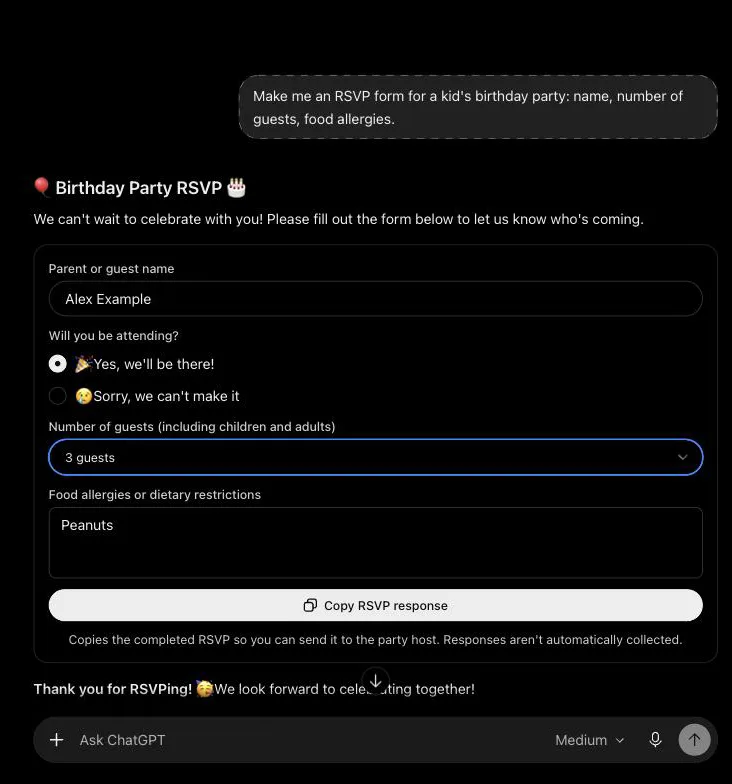
06. RSVP form
Make me an RSVP form for a kid's birthday party: name, number of guests, food allergies.Name, attending, number of guests and allergies, with a button to copy the reply. It doesn't collect answers for you, so you copy the reply and send it yourself.
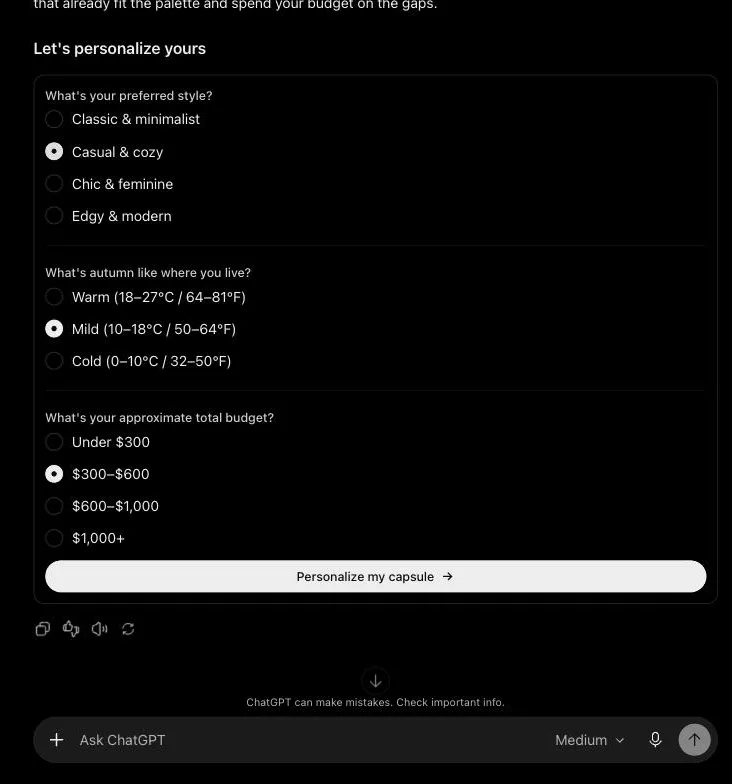
07. Capsule wardrobe
Help me build a capsule wardrobe for autumn, about 10 pieces.A colour palette, ten pieces and six outfits, then a short form for your style, climate and budget. Submit it and the plan is redone for you, with a budget table.
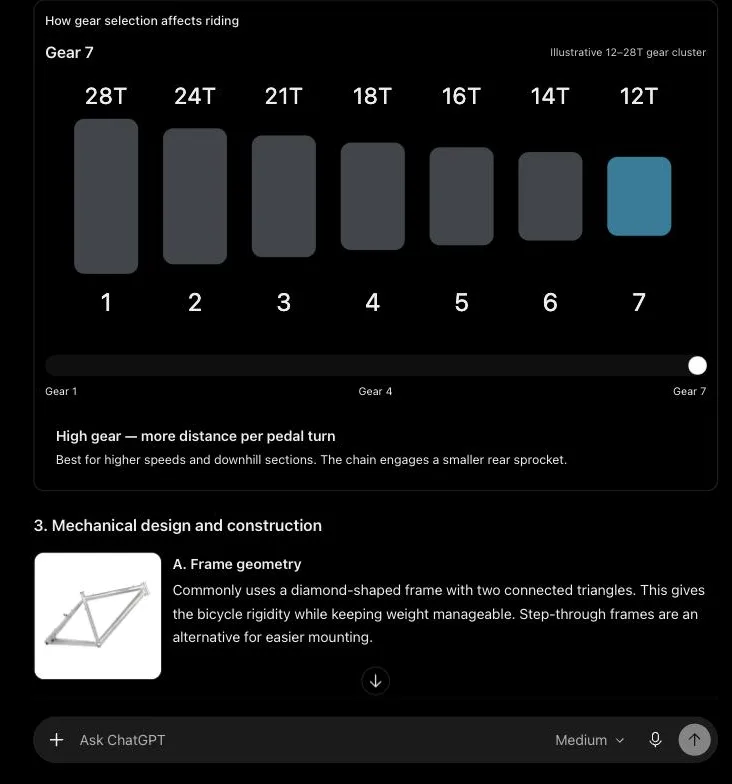
08. How a bike's gears work
break down the design of a 7-speed bikeA parts table and a gear slider. Drag from gear 1 to gear 7 and the highlighted sprocket and the riding tip change with it.
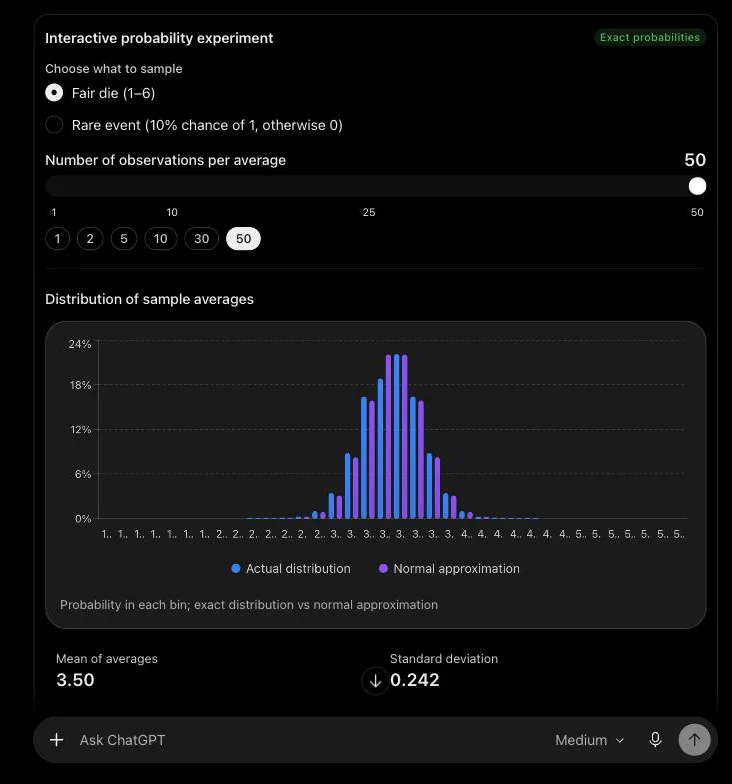
09. A statistics idea you can play with
Explain the central limit theorem so I can play with it.A probability chart you can change. Pick 1 to 50 dice rolls per average and watch the bars go from flat to a narrow bell.
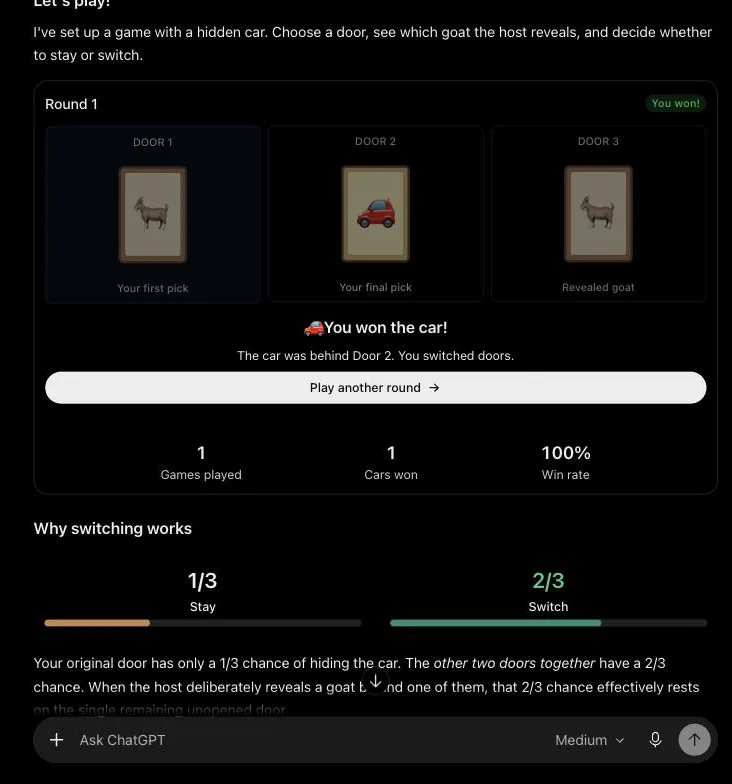
10. The Monty Hall game
Explain the Monty Hall problem and let me try it.Three doors and a scoreboard. Pick a door, the host opens one with a goat, switch, and see why switching wins about two times in three.
40 more prompts to try
Money
- "Make me a monthly budget planner. I'll enter my income, then give me sliders for rent, groceries, transport and savings, and show what's left over."
- "Build a loan payoff calculator with my balance, interest rate and monthly payment. Add a chart that shows how much sooner I'm done if I pay a bit extra."
- "We're splitting rent between housemates by room size. Let me enter each room's size and the total rent, and show what each person pays."
- "Estimate what my blog could earn. Let me enter monthly visitors, ad earnings per 1,000 views and affiliate sales, and chart what happens if traffic doubles."
- "List my subscriptions with a tick box for each one I'm keeping, and a monthly total that changes as I tick."
- "How big should my emergency fund be? Let me enter my monthly costs and how many months I want covered, then show how long it takes at my savings rate."
Run a business
- "I have a monthly ad budget. Give me sliders to split it across channels and show how many leads each one might bring in."
- "Lay out my product launch as a checklist I can tick off, grouped by week, from four weeks out to launch day."
- "Put my brand and three competitors side by side using only the notes I paste below. Don't fill gaps from memory; mark them unknown."
- "Make a simple interactive explainer for a client: if fewer visitors sign up on the landing page, how many fewer customers do we end up with?"
- "I need a creative brief. Start with a form: goal, audience, key message, deadline and budget. Then write the brief from my answers."
- "Turn this product list into a short quiz that points a customer to the right product. Let me click through it."
- "Here's my article. Plan how to turn it into social posts, a newsletter and short videos, with buttons to filter by channel."
- "Give me a 30-day content calendar for my niche: one idea a day, a tick box for each, and a progress bar."
- "Work out what my workshop will cost. Let me change the number of people, room hire, food and materials, and add 10% for surprises."
- "Build a quote calculator for my cleaning business: hourly rate, number of rooms, extras, and a total with tax."
- "Make a sign-up form for new clients: company, industry, budget, deadline and service needed. Don't let me submit it with a required field empty."
- "Make a break-even calculator: price, cost per unit and monthly fixed costs, with a chart showing when I start making money."
Learn
- "Teach me the first five Japanese hiragana characters with tips on how to say them, then quiz me."
- "Teach me ten Spanish words for ordering food, then quiz me on them."
- "Show me, step by step, what happens when I type a web address and press Enter, as a diagram I can click through."
- "How does a heat pump work? Show me a diagram where I can tap each part to see what it does."
- "Explain compound interest with a slider for years, and show the same money with and without interest."
- "Show me what $100 buys over 20 years at different inflation rates, with a slider."
- "Turn my training notes below into a five-question quiz for new staff. Ask one question at a time and keep score."
- "Make a times-tables practice game for a 9-year-old."
Decide
- "Help me choose between three laptops. Give me sliders for how much battery life, weight and price matter to me, and show which one wins as I move them."
- "Should I rent or buy a home? Compare them side by side with sliders for price, rent, deposit and years."
- "Compare two job offers. Let me weight salary, commute and growth, and show which comes out ahead."
- "Compare these three venues using only the details I paste: price, capacity and access, side by side. Mark anything that's missing."
- "Help me choose between three cities to move to. Let me weight cost of living, weather and jobs."
Plan
- "Plan three days in a city I'm visiting, with a budget slider that changes the plan as I move it."
- "Plan a three-day hike with each day's route and distance on a map."
- "Make a packing list that changes with trip length and weather, with tick boxes."
- "Plan my meals for the week with a shopping list I can tick off."
- "Make a four-week beginner workout plan with a tick box for each session."
- "Build an event timeline where I can change the start date and every step moves with it."
- "Make a study plan up to my exam date with daily tasks I can tick off."
Play
- "Make me a classic snake game I can play right here, with a score and a restart button."
- "Make a 10-question trivia quiz about the 90s and keep score."
Things to take note of
- ChatGPT picks the format. If you get text, ask for the tool by name.
- It may use your local currency or rules. Say which you want in the prompt.
- Some answers use photos from websites. Ask before you reuse them.
- Check any number before you act on it.
- It only works in the Chat tab, not in the Work tab, Voice or the Pro reasoning option.
Questions
Do I have to turn it on?
No. ChatGPT picks the format from your question. For fewer visuals on the web, go to Personalization, then Layout and Visuals, then Simple.
What if I only get text?
Ask for the tool. Name it ("a calculator", "a quiz") or say what you want to change ("let me adjust the budget").
Which plans get it?
It's rolling out to every plan, Free, Go, Plus, Pro, Business and Enterprise, in the Chat tab. On Enterprise it depends on your admin's settings.
Will my inputs be saved?
It depends on the tool. Some, such as checklists, keep their state when you refresh the chat, but nothing carries over to a different chat.
Does a form send my answers anywhere?
No. The forms I made either passed my answers back to ChatGPT as my next message or gave me a button to copy them.
Where doesn't it work?
The Work tab, Voice and the Pro reasoning option.