TEST 018
Turn scans, tables and screenshots into clean text on your own laptop, free and offline
Short answer
Indra OCR is a free tool from Datalab that turns scanned PDFs, photos of pages and screenshots into clean text on your own computer, with no graphics card and no internet after a one-time 76 MB download. In my test on three made-up documents it got 128 of 129 fields right in 7 seconds, against plain Claude's 129 of 129 in 27 seconds, and the files never left the laptop.
Indra OCR is a free tool from Datalab. OCR means it reads the words in a picture: a scanned PDF, a photo of a page, a screenshot. It runs on your computer's normal chip, no graphics card, and after a one-time download it works offline, so your files never leave your laptop.
Link: https://github.com/datalab-to/indra (the models: https://huggingface.co/datalab-to/indra-ocr)
Install (under a minute)
Needs Python 3.10 or newer, on a Mac or Linux (the systems the maker tests). In Terminal:
python3 -m venv indra && source indra/bin/activate
pip install indra-ocr
The first time you run it, it downloads its models (about 76 MB). After that it needs no internet.
The one command
indra-ocr statement.pdfThat prints the page as clean text (Markdown), tables included. More ways to use it:
- Save it to a file:
indra-ocr statement.pdf > statement.md - A whole folder at once:
indra-ocr *.pdf --out results/(one text file per document) - Words with their position on the page:
indra-ocr scan.png --format json - See the boxes it found, in your browser:
indra-ocr-viewer(opens http://localhost:8765)
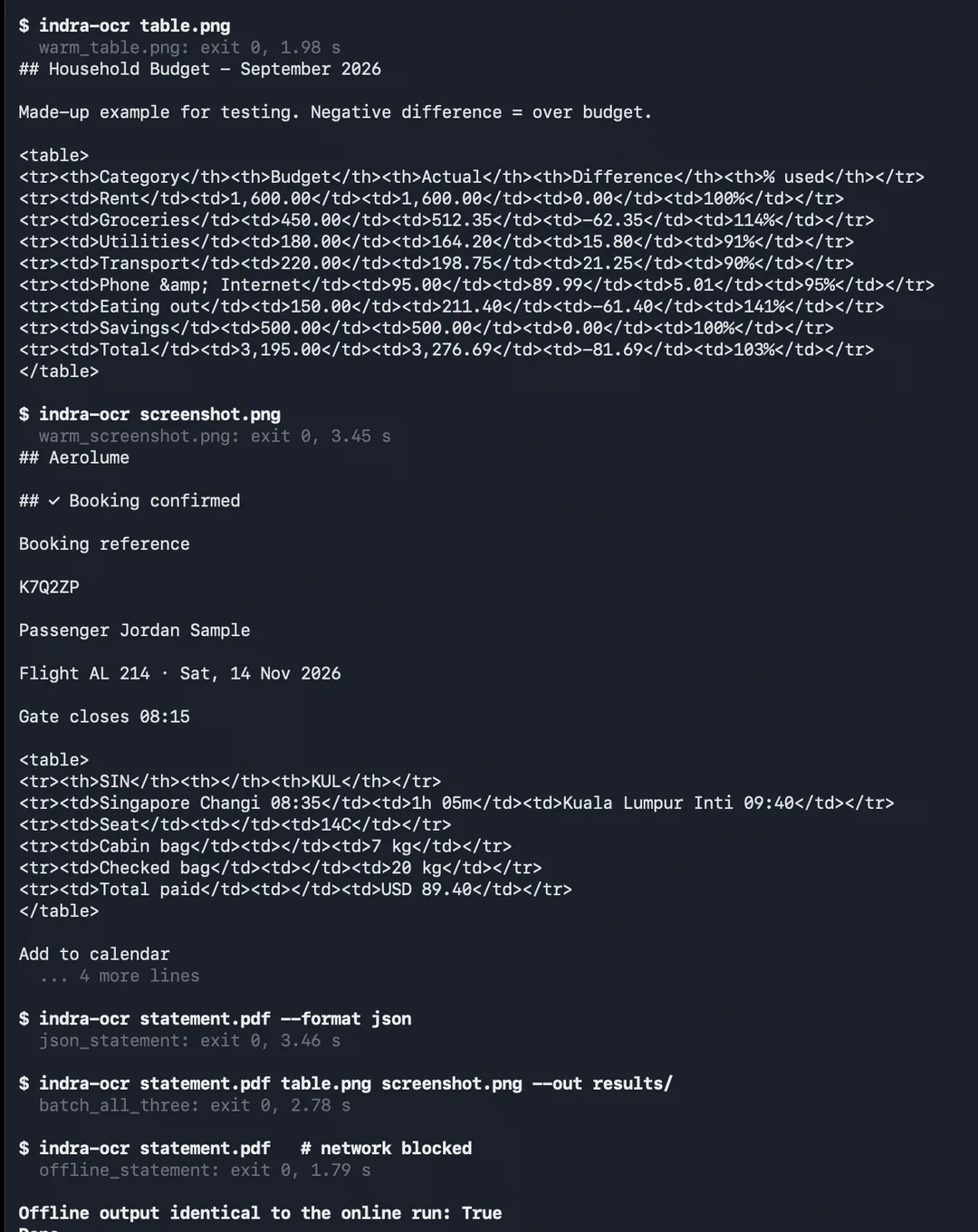
The catch
- Handwriting: it is weak on it (25.2% on the maker's own handwriting tests). Faded scans and complicated tables are its other weak spots.
- Licence: the code is free (Apache-2.0), but the models are free only for research, personal use and startups under $20M in funding or revenue, and can't be used to compete with Datalab's own service. A bigger company needs a paid licence.
- Disk: the install takes about 316 MB (it brings ONNX Runtime and OpenCV) plus the 76 MB of models.
- Rows: on a crooked page it can put a number on the next row. Check tables before you use the numbers.
What I measured
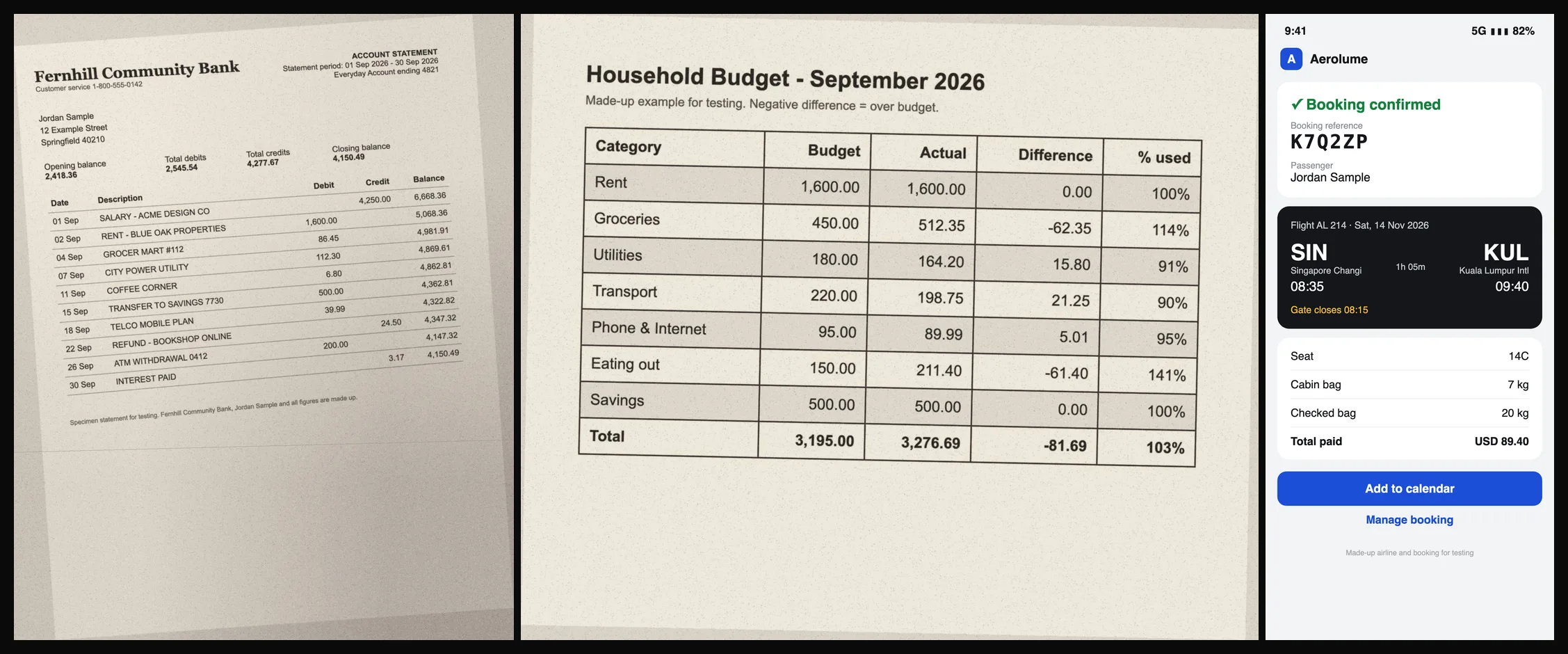
Three made-up documents (no real data): a bank-statement page made to look like a crooked scan, a budget table made to look photocopied, and a phone-size screenshot of a flight booking app. Indra on a MacBook Air (M5) against plain Claude Code (Sonnet 5.5) reading the same files.
| Indra OCR | Plain Claude Code | |
|---|---|---|
| Statement: words and numbers right | 57 of 57 (one row split in two) | 57 of 57 |
| Table: words and numbers right | 46 of 46 | 46 of 46 |
| Screenshot: words and numbers right | 25 of 26 ("Inti" for "Intl") | 26 of 26 |
| Time, three files one at a time | 7.0 s | 27.4 s |
| Time, all three in one command | 2.8 s | n/a |
| Works with the internet blocked | yes, same output | no, each file is sent to Anthropic |
| Cost | $0, no account | about 141,000 tokens of your Claude plan |
Plain Claude was a little more accurate. Indra was about four times faster, free, and kept the files on the laptop. One run per file, so treat it as one honest test, not a promise.
5 tips
- Use it for files you'd rather not upload: bank statements, payslips, contracts, ID scans.
- Do a whole folder in one command. It loads its models once, so three files took less time than one file three times.
- Photograph pages flat and well lit. The only row it split in my test was where the page was most crooked.
- Check every number you copy out of a table against the original.
- For handwriting, use something else (plain Claude read everything here correctly).
Questions
What is OCR?
Optical character recognition. It reads the words in a picture (a scan, a photo of a page, a screenshot) and gives them back as text you can copy, search and edit.
Does it need the internet?
Only the first time, to download its models (about 76 MB). After that it works with the internet off; in my test the output was identical with the network blocked.
Is it free?
The code is free. The models are free for personal use, research and startups under $20M in funding or revenue. A bigger company needs a paid licence from Datalab.