TEST 014
6 more free apps that work like AutoCAD, Pro Tools, Figma, PowerPoint, Excel and Word
Short answer
These six ArtCraft Crafting Apps are free, open-source desktop apps for Mac, Windows and Linux. Each works like a well-known tool: CADCraft (AutoCAD), SoundCraft (Pro Tools), FigCraft (Figma), DeckCraft (PowerPoint), GridCraft (Excel) and WordCraft (Word). They install from the free ArtCraft Launcher. They are young software: DeckCraft and CADCraft are labelled early development, FigCraft early alpha and SoundCraft pre-alpha.
These six free apps have downloads for Mac, Windows and Linux computers, so save this page for your laptop. The first three work like tools people pay for. The last three work like Word, Excel and PowerPoint, which are free in a browser after you sign up, with your files saved in Microsoft's OneDrive; these run on your own computer and open the same kinds of files.
They come from ArtCraft, which makes free apps with public code. It already released seven that work like Adobe's (that guide is here).
The links
The easiest way is the free ArtCraft Launcher, one installer that adds each app. Download it from getartcraft.com/apps, open it, and press Install next to each app. Or tap an app's name below to open its GitHub page and find its downloads.
| App | Works like | What the original costs | Make this first |
|---|---|---|---|
| CADCraft | AutoCAD, for drawing building plans | from $175 a month | A floor plan of one room, with measurements |
| SoundCraft | Pro Tools, for recording and mixing music | $99 to $599 a year (Artist to Ultimate) | A mix of two audio tracks |
| FigCraft | Figma, for designing app screens | $16 a month per Professional full seat | An app screen you can click through |
| DeckCraft | PowerPoint | free in a browser | A five-slide pitch with a chart |
| GridCraft | Excel | free in a browser | A monthly budget that updates itself |
| WordCraft | Word | free in a browser | A one-page CV, saved as Word and PDF |
Prices were read from each company's own page on 16 October 2026, in US dollars; the AutoCAD and Microsoft pages are US pages. Pro Tools and Figma also have limited free versions (Pro Tools Intro and Figma Starter).
01. CADCraft: a floor plan of one room
Draw the four walls of one room, leave gaps for a door and a window, then add each wall's length to the drawing. If you have used AutoCAD, it works the same way: type L for a line, then click two points.
02. SoundCraft: a mix of two tracks
Open two sound files. Set each one's volume and its left-right position, fade the start and the end, then save the mix as a WAV audio file.
03. FigCraft: an app screen you can click through
Make one phone-sized screen with a heading, a card and a short list. Copy it to make a second screen. In the Prototype tab, link a button to the second screen and press play: you can now tap through both screens like a real app.
04. DeckCraft: a five-slide pitch
A pitch is a short deck that sells an idea. Five slides: the name, the problem, your offer, the numbers, and what you want from the audience. Put one big number per slide and one chart on the numbers slide. Save as PowerPoint to share, or PDF to send.
05. GridCraft: a budget that updates itself
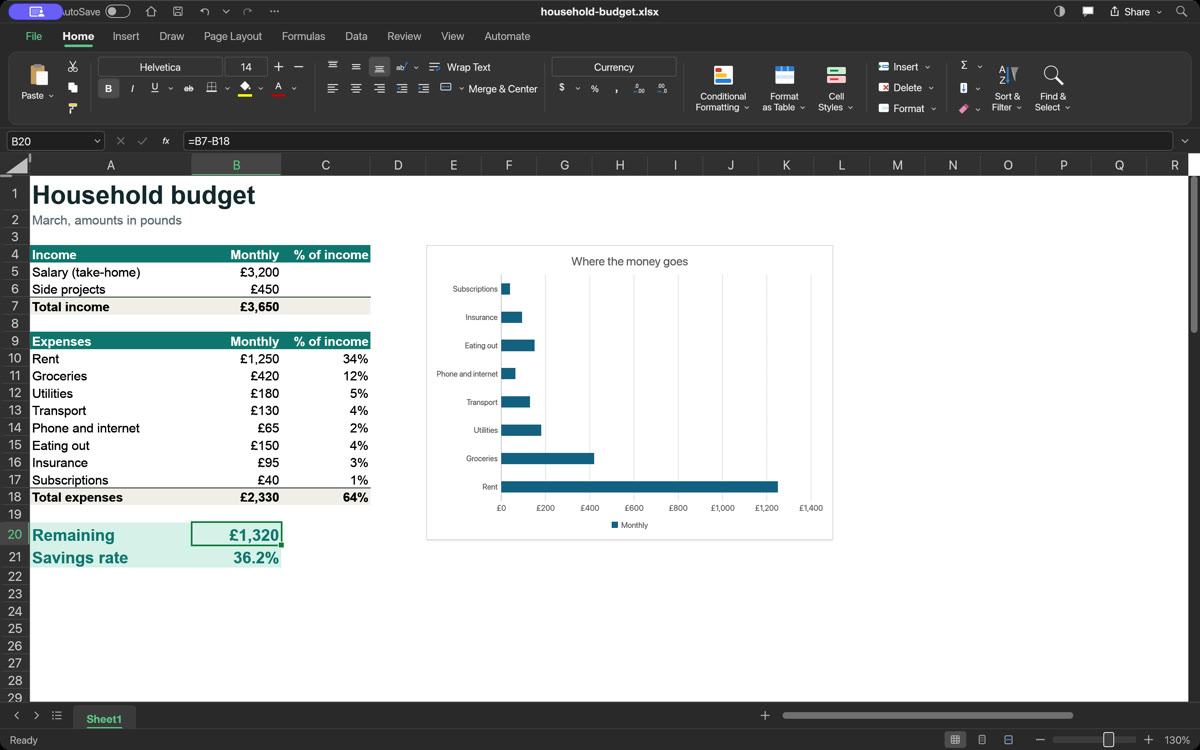
List your income at the top and your monthly costs below. Add a SUM for total costs, then Remaining (income minus costs) and a savings rate (Remaining divided by income). Change one cost, like rent, and every total updates. Add a bar chart to see where the money goes.
06. WordCraft: a one-page CV
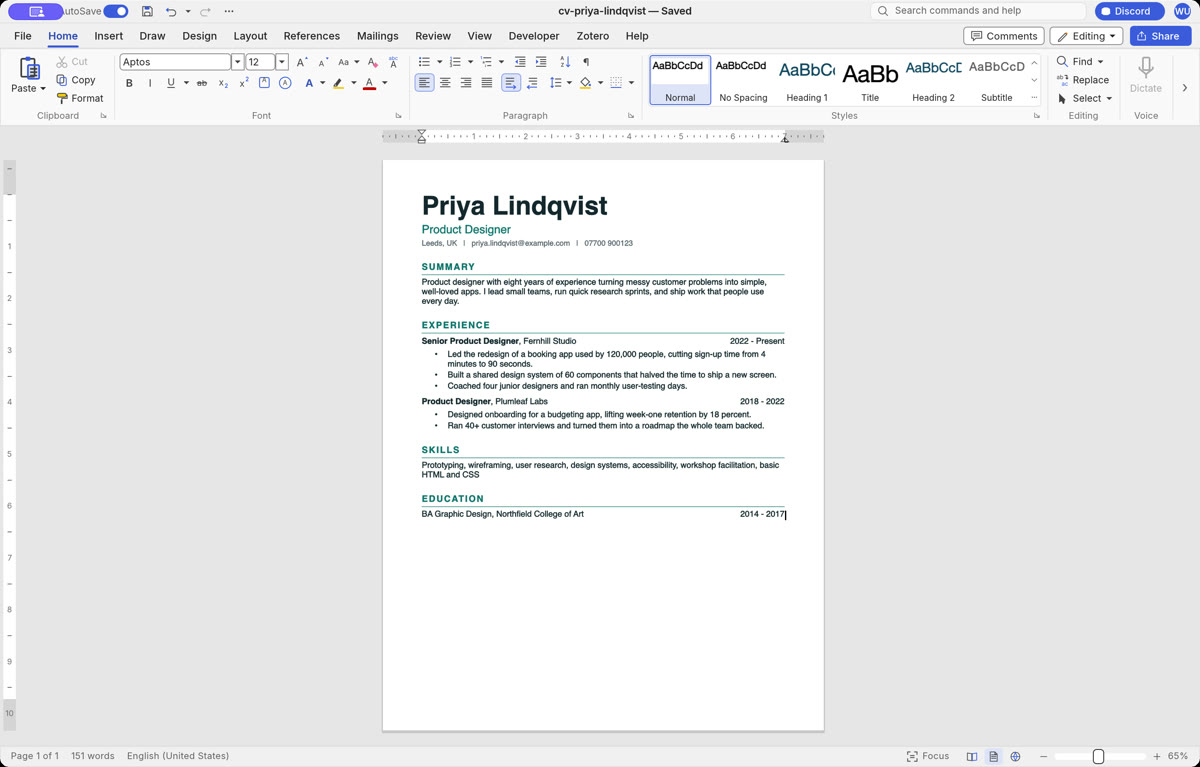
Start a blank document, add your name as a Title, then a heading for each section: Summary, Experience, Skills, Education. Use bullets for what you did in each job. Save as Word (.docx) to send, and save a PDF to attach.
Things to take note of
- They are new. DeckCraft and CADCraft are labelled early development, FigCraft early alpha and SoundCraft pre-alpha, which all mean still being built. Expect bugs, and keep important work in a format you already use.
- Test your own files first. The apps open and save Word, PowerPoint and Excel files, but a complex file may not look exactly the same.
- These apps change fast. Check each app's GitHub releases page for new versions.
- SoundCraft may offer to recover unsaved work the next time you open it.
- If you let an AI like Claude use them, start with one small job and check the result before you give it the next one.
Questions
Are they really free?
Yes. ArtCraft calls the apps free to use, and the code is public (open source, under the MIT or Apache-2.0 licence).
Can I open my Word, PowerPoint and Excel files?
Yes, according to each app's own page. WordCraft opens and saves .docx and opens older .doc files. DeckCraft opens and saves .pptx. GridCraft opens .xlsx, and older .xls files open with their values, formulas and number formats, but not the rest of their formatting yet. Test the files you depend on before you switch.
Do they run on Windows?
Yes. Each app has Mac, Windows and Linux downloads on its GitHub releases page.
Do they work offline?
They are desktop apps that run on your own computer. FigCraft says it works offline and contacts no server until you share or join a file.
Can an AI use them?
Yes, with some technical setup. Each app can take commands from an AI agent like Claude, through a command line tool or an MCP server (a standard way to plug tools into an AI). You can skip this and use the apps normally.